Table of Contents!
Just some ways to make math easier to explain and show others as well. This page focuses on coloring math as well as striking out terms in equations to make it easier to explain steps in problems.
Coloring Math
Sometimes when an equation is complex and difficult to explain, adding custom colors via the colors feature in mathjax helps. It’s easy to color math with the \color{..}{..} or {\color{..} text} macro providing the color and the expression to color. Note that {\color{..} text} is a safer method that doesn’t allow for colors to be put outside of the braces for operators like addition and subtraction. The standard colors, like green, blue, orange, yellow, and so on are there. To save you time and energy, the basic colors orange, blue, brown, green, pink, purple, red, gray, and black have all been made macros, so to write anything in orange with in math mode, just type \orange{..} and it will appear so. Same with all the other colors. Additional ones without macros are given below:
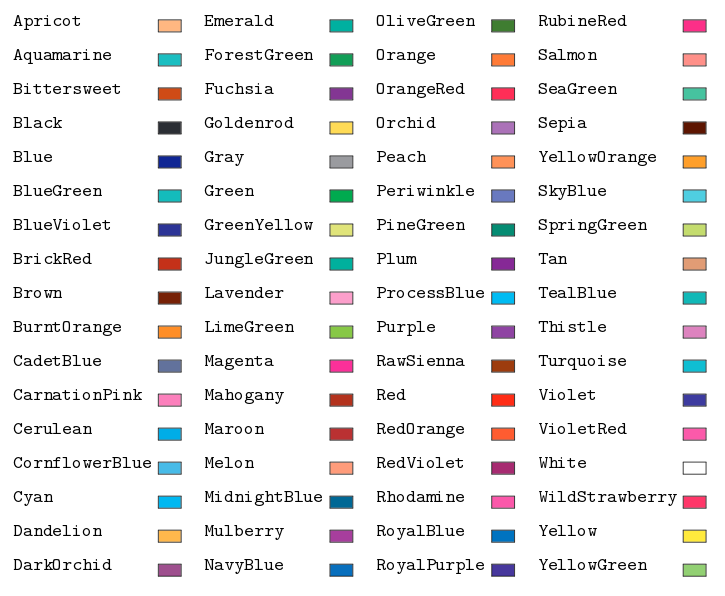
We can make $\color{BurntOrange}{x^2}$ from \color{BurntOrange}{x^2}. For example, were one to have something like
explaining the various vectors in the column spaces via colors can help. Let’s make them all orange, blue, and black:
\[\pmatrix{\orange{\al_{11}} & \blue{\al_{12}} & \al_{13} \\ \orange{\al_{21}} & \blue{\al_{22}} & \al_{23} \\ \orange{\al_{31}} & \blue{\al_{32}} & \al_{33}}\]the latex for used \orange{\al_{11}} for the first column, \blue{\al_{12}} for the second and so on. Now, if you want to explain the vectors in the column space, you can just reference the color. Or if you want to write in terms of colors you can also just reference the color as in “the orange numbers make up the first vector this matrix has in it’s column space” and this can make explaining easy. And, it can also make referencing the vectors themselves for vectors as in $\orange{\vec{v}_1}$, $\blue{\vec{v}_2}$, and $\vec{v}_3$. Then you might write things as in
Just as an aid to demonstration. You can also use colors to point out certain things in formulas like the discriminant in the quadratic formula
\[x = \frac{-b \pm \sqrt{\green{b^2 - 4ac}}}{2a}\]just to make things more clear. Or even in the upper and lower limits of integration:
\[\int_{\orange{0}}^{\blue{1}} x^{7} dx = \frac{x^{8}}{8}\bigup_{\orange{0}}^{\blue{1}} = \blue{\frac{1}{8}} - \orange{\frac{0}{8}}\]or $\P{\color{purple}{\text{purple}}} = 0.3$ for a nice way to show color relation. As another example, if you want to highlight two different random varables have different distributions as in $X_1 \sim \orange{\N(0,1)}$ and $X_2 \sim \blue{\pois(5)}$ we can write the sum as ${\orange{X_1}} + \blue{X_2}$. Also for explaining…
\[f({\green{x}}) = \bel{\green{x^2} + \color{black}{\pi} {\green{x}} + 8}{\text{input colored}}\]Great for trig as well…
\[\sin({\orange x} + {\blue y}) = \sin({\orange x})\cos({\blue y}) + \sin({\blue y})\cos({\orange x})\]by seeing the colors change you can see the angles have changed or permuted. Linear systems work as well…
\[\begin{cases} \orange{3x} + \blue{5y} = 4 \\ \orange{-2x} + \blue{4y} = 2 \end{cases}\] \[\impl \orange{x} + \blue{9y} = 6 \impl \orange{x} = 6 - \blue{9y}\]Note: You can use colors in mhchem as well as physics too!
\[\ce{\blue{\ce{H2O}} <=> H2 + \gray{\ce{O2}}} \\ \green{\curl} f(x, y, z) = \vec{g}(x,y,z)\]with the code as
\ce{\blue{\ce{H2O}} <=> H2 + \gray{\ce{O2}}} \\
\green{\curl} f(x, y, z) = \vec{g}(x,y,z)
just make sure to wrap inside the color for mhchem the \ce{..} again.
Strikeout Math
You can also strike out or cancel difficult parts in a computation to illustrate the way to solve things as well using the \cancel{..} macro. An example use is $\cancel{f(x,y)_3}$ using latex \cancel{f(x,y)_3}. One use might be with lengthy equations:
or maybe
\[\frac{\cancel{x^6}\cancel{y^7}\cancel{z^8}}{\cancel{x}\cancel{y}\cancel{z}} = x^5 y^6 z^7\] \[\frac{10 \cdot 20 \cdot 50}{200} = \frac{10 \cdot 20 \cdot 50}{50 \cdot 4} = \frac{10 \cdot 20 \cdot \cancel{50}}{\cancel{50} \cdot 4} = \frac{10 \cdot \cancel{4} \cdot 5}{\cancel{4}} = 50\]If you want to show an arithmetic formula demonstration as “the answer was … and using the forms of the inputs we arrive at …”.
Sometimes even with probability statements
\[\P{X + \cos(Y) = X - 1} = \P{\cancel{X} + \cos(Y) = \cancel{X} -1} \\ = \P{\cos(Y) = -1}\]Putting them both together
You can add color and striking out as well for more clarity. The way to do so is given by the form \color{\cancel{..}} or {\color{..} \cancel{..}} which just means wrapping the \cancel{..} macro inside the \color{..} macro. You can have statements like (separating the parts we need and what we have known: green is unknown and orange is known):
Wrapping up
That concludes how to color and cancel math equations and expressions. It’s as easy as possible with the macros. Happy math coloring as well explaining well!